Made by Arnesh Banerjee · arneshbanerjee.dev
Free and open source
See how AI agents use your product.

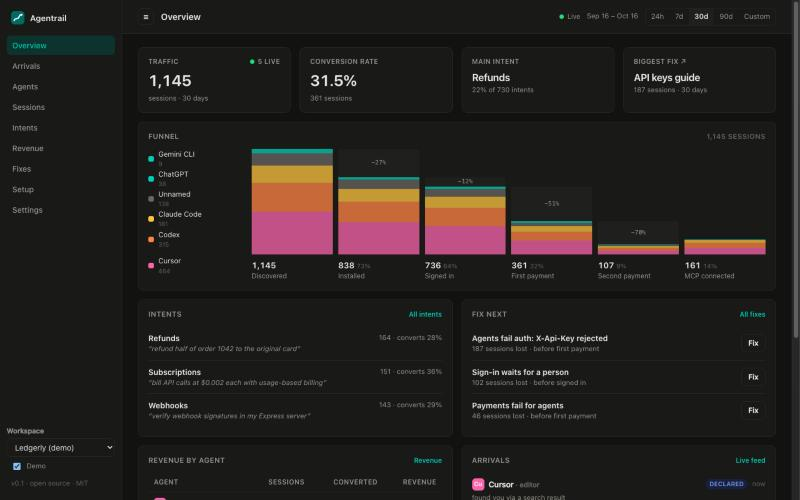
Claude Code, Codex and Cursor now read docs, sign up and pay for people. Normal analytics miss them. OpenScope shows each agent, what it came to do, and where it gets stuck.
The OpenScope dashboard: agent traffic, conversion, main intent, biggest fix and a funnel by agent

Everything an agent does, in one place

Agents never run page scripts. OpenScope collects on your server, so it sees what other tools cannot.

Every agent, named

See each agent the moment it arrives, with the evidence for its name: verified, declared or inferred.

The task, in their words

A docs finder answers agents with the right pages. The question they ask is the task the person gave them.

Every step, and where it broke

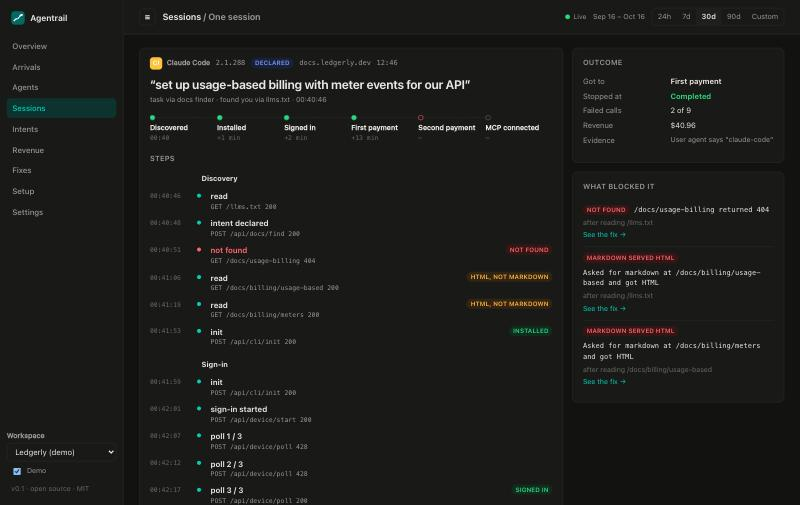
Follow each journey from the first page read to the first payment, and see the exact call that stopped it.

Fixes, live in one click

The biggest blockers are ranked by revenue and drafted for you. Confirm, and agents get the corrected page at once.

Works with plain Claude Code

Nothing to install in the agent. Ask Claude Code to do a normal task with your product, and watch it happen.

  1. 1It arrives. The session appears live, with the agent's name and its task.
  2. 2It gets stuck. A wrong header in your docs fails its first API call.
  3. 3You fix it. The corrected page is drafted for you. One click, and the next agent gets through.
One agent session: the task, a step tracker, and every step grouped by phase
Self-hostedOne server and one SQLite file. Runs with Node or Docker.
Private by defaultPeople's traffic never leaves your server. Personal data is removed before it is stored.
No API key neededFixes are drafted with Claude Code on your machine, or any Anthropic, OpenAI or Gemini key.

Running in a minute

You need Node.js 22.18 or newer. Then open localhost:4318 and turn on Demo to look around.

Read the full steps
# get the code
git clone https://github.com/ArneshBanerjee/openscope.git
cd openscope

# install and start
npm install
npm start